
Free Graphic Design Moodboard template
Compare visual references and a working color palette on an open canvas before committing to a brand, website or campaign direction.
Opening…In the board menu, choose Templates → Graphic Design Moodboard. Choose whether to keep example content, then Apply.
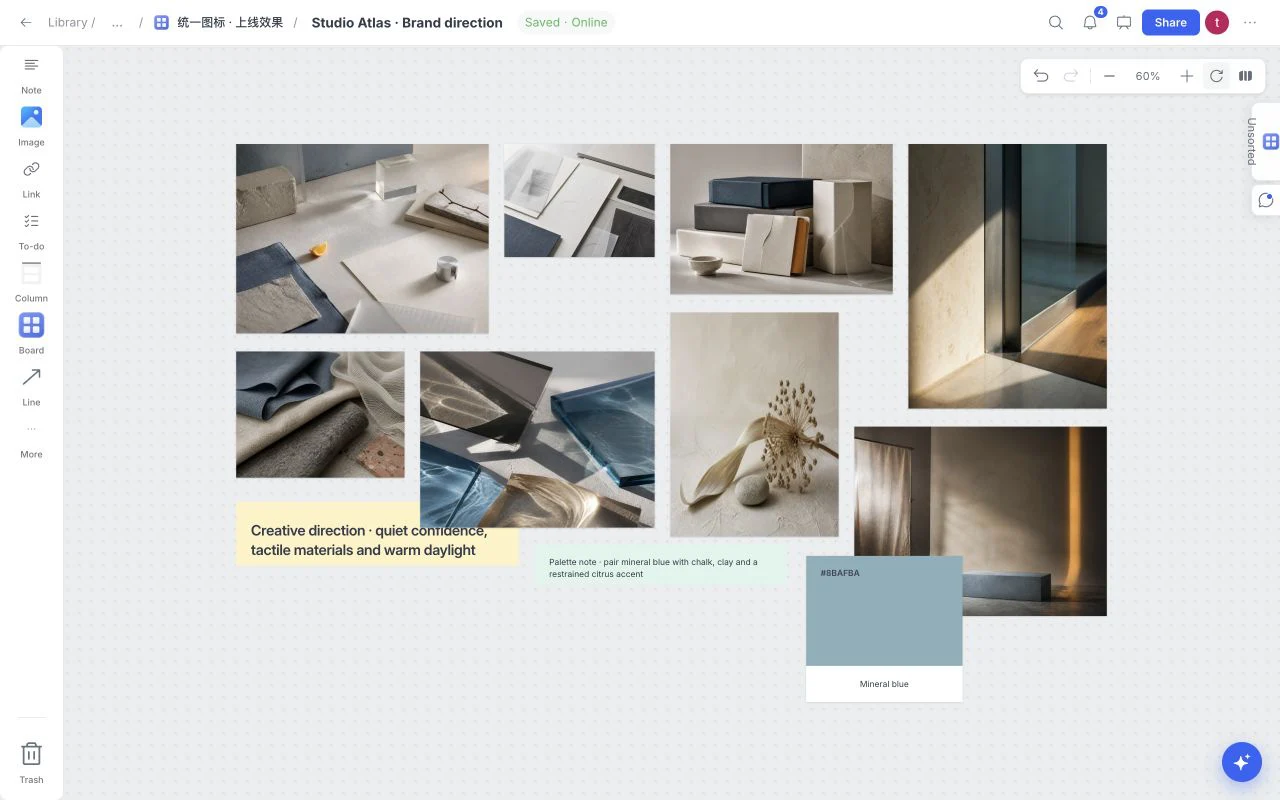
What is inside this graphic design moodboard template?
The starter board separates the project into practical sections so references stay connected to the decisions they support. Keep the complete structure or remove anything your project does not need. Use this starting layout to answer a concrete project question. Every example can be edited, and the entire template application can be undone in one step.
Direction
Reference images
Materials
Working palette
How to use the graphic design moodboard template
- Open a board, choose Templates from its menu and select Graphic Design Moodboard. Apply with or without example content.
- Drop in references, links, files, and notes directly on the canvas.
- Edit the board until every item reinforces one clear direction.
- Use review and presentation tools when the direction is ready to discuss.
What a strong graphic design moodboard looks like
- Name the audience and the quality the direction should express.
- Select references for light, proportion, material or composition; write what to borrow.
- Keep contrasting directions separate, then remove references that weaken the chosen idea.
Who is this template for?
Brand designers and art directors choosing a coherent visual territory. It works as a starting point, not a locked deliverable, so the board can change with the project.
Compare all moodboard templatesFrequently asked questions
Clear answers about plans, templates, sharing, and account access.
Is the Graphic Design Moodboard template free?
Yes. The current Moodboard experience and its starter templates are available without a paid subscription. Paid plans are not yet for sale.
Can I customize the Graphic Design Moodboard template?
Yes. Rename, remove, reorder, or extend the sections and add your own images, notes, links, files, colors, tasks, and sketches.
Do I need to follow every starter section?
No. Keep only the sections that help your project reach a clear decision. A smaller, deliberate board is better than a complete-looking board filled with irrelevant material.