
How to organize a design project without losing its references
Connect the brief, visual research, tasks and review questions through linked boards instead of building one endless gallery.
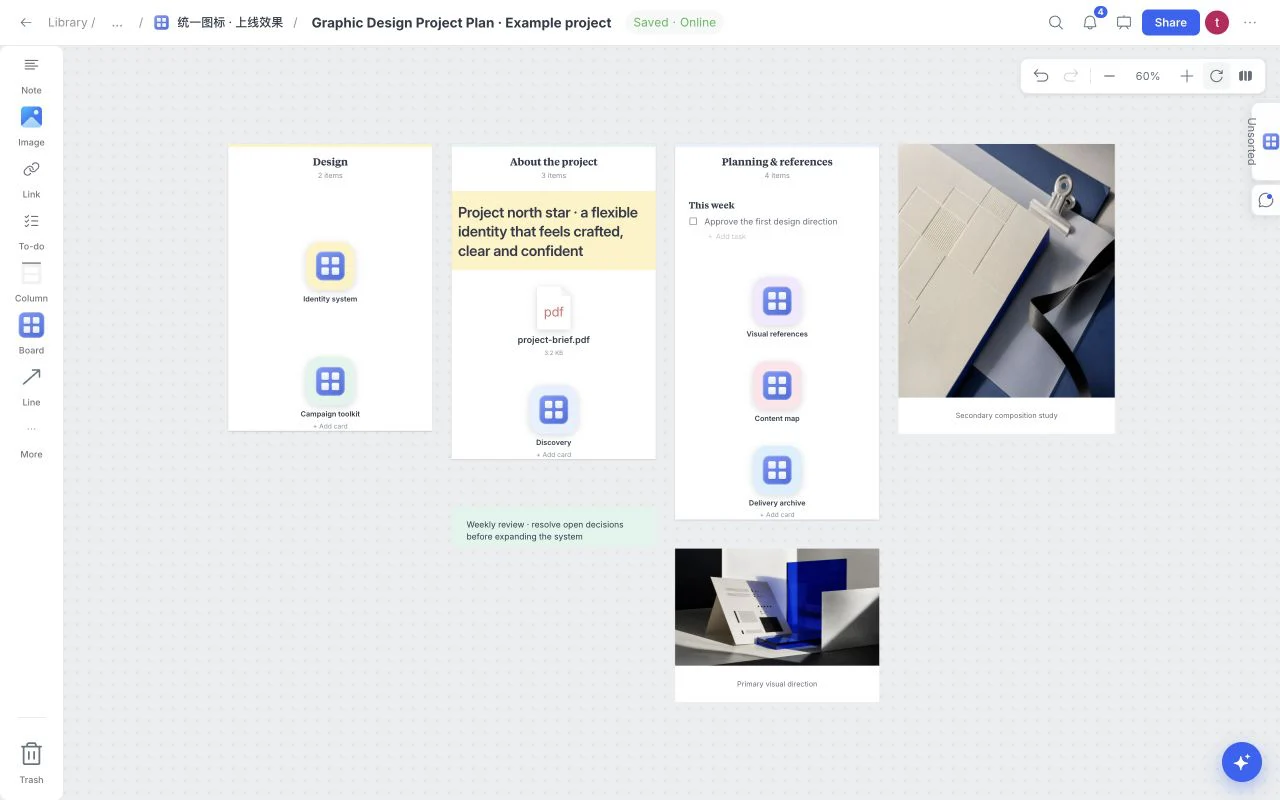
A reference is most useful when the next person can recover why it was selected. A folder preserves a file; a design workspace should preserve the question, the source and the current decision beside it.
Give the project an overview board
Start with Graphic Design Project Plan from the board’s Templates menu. Its linked areas separate design work, background and inspiration, with a brief close to the project overview. Rename those areas to match the work instead of retaining sections simply because the template includes them.
Keep the hub readable in one glance. It should answer what the project is, which part is active and what happens next. Detailed research belongs inside its own board, while the hub provides the path back to it.
Keep sources close to interpretations
Use a Link for the original source, an Image for the visual reference and a Note for the interpretation. If a photograph illustrates low-contrast light, write that explicitly. The source and the design inference are different pieces of information.
For documents, use headings to separate the brief, constraints and unanswered questions. Files can keep supporting material nearby, with recognizable format labels and filenames. The upload limit is 32 MiB per file; keep original files independently when they are irreplaceable.
Separate the current decision from the archive
A board becomes difficult to read when every discarded option stays in the main path. Move exploration into a separate area or child board and keep a short decision note near the selected direction. Canvas Undo and Redo are useful while editing; they should not replace a written record of why the team chose something.
| Area | Include | Keep elsewhere |
|---|---|---|
| Project hub | Brief, current decision, next action | Every reference ever collected |
| Research board | Source links, observations, hypotheses | Unsupported conclusions |
| Working board | Current design direction and tasks | Unrelated inspiration |
| Review board | Focused options and review questions | Internal drafts the recipient does not need |
Turn the next move into a task
Use To-do for a concrete deliverable rather than a vague project aspiration. “Choose three material references for Friday’s review” is easier to complete than “Improve the direction.” Add task context only where it changes the next action.
Columns can group related notes and tasks, while linked boards hold deeper project areas. Search finds content when the workspace grows beyond one screen; Fit board returns the overall view.
Reuse the structure after it works
The board menu offers Use as template for a reusable starting point. Remove client-specific material and completed decisions before creating a structure for the next project. A good template preserves useful questions, not the answers from the last job.
Browse the Design Project Plan template or Agency Hub depending on whether you are organizing one project or several studio workspaces.